Job hunting can feel like a part-time job: copy-pasting details, tweaking résumés, and racing deadlines that close within hours. Enter auto-apply bots—apps that pull listings, fill every field, and fire off role-specific documents while you sip coffee. We put 10 leading tools through a nine-factor test, balancing application quality, speed, safety, and cost. In the pages ahead, you’ll see which bot fits your goals and budget, plus tips to keep your LinkedIn account safe. Let’s reclaim your job-search hours.
How auto-apply job bots work and why they’re booming
Picture the standard application cycle. You find a posting, paste in your contact info, upload a résumé, rewrite a cover letter, hit submit, and repeat. A bot collapses that grind into minutes.
Most tools follow the same three-step loop. First, they pull fresh openings from public job boards and company career pages. Then they map the fields in each form to the details you stored during setup, including your name, visa status, portfolio links, and answers to knock-out questions. Finally, they fire off the application at the pace you set, logging proof of submission so you can track every shot you take.
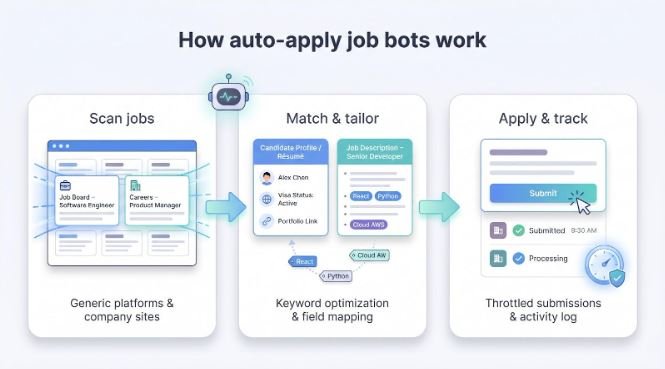
Early bots simply sprayed one résumé everywhere. Today’s leaders do more. They parse each job description, score how well you match, and splice keywords into custom résumés or cover letters before the form loads. That shift from brute force to targeted automation lifts interview rates while total volume comes down.
Touted by users as the best AI job automation tool, AIApply offers a real-world benchmark.
Usage data on its site shows that candidates who send AIApply-rewritten résumés are 80 percent more likely to land a job faster than those who apply with static PDFs—a reminder that smart keyword tailoring, not sheer volume, decides whether an application clears ATS gates.
Speed matters too. A listing on LinkedIn Easy Apply can draw hundreds of clicks within hours. Bots give you a head start by submitting while the role is still warm, which bumps your application to the top of the recruiter’s queue. For contractors and international candidates chasing sponsorship, that timing edge can be the difference between an email back and silence.
Adoption surged after hiring platforms raised the entry bar. Recruiters lean on ATS filters, serial applicants juggle dozens of roles, and remote gigs close faster than you can bookmark them. Bots solve all three pressures: they dodge repetitive typing, scale outreach beyond what any human can manage, and, when configured well, keep quality signals intact.
In short, these tools act like an always-on assistant that scouts openings, customizes documents, and submits polished packets while you focus on interview prep and networking. According to a 2025 LinkedIn recruiter survey, up to 90 percent of employers now report an influx of AI-generated applications, which explains why we’re here to separate the winners from the gimmicks.
How we scored each bot
Before we name any winners, you should see the yardstick.
We graded every platform on nine criteria, each weighted by how much it influences interview results: personalization (25 percent), job-match relevance (15 percent), user-reported success (15 percent), safety (15 percent), scale (10 percent), integration breadth (5 percent), user control (5 percent), speed (5 percent), and cost (5 percent).
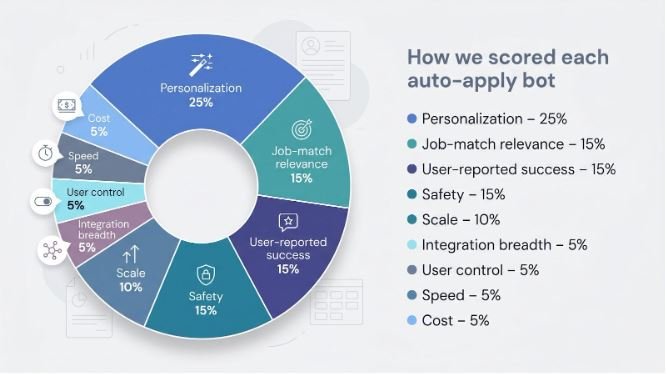
Personalization carries the most weight. An app that threads role-specific keywords into your résumé impresses recruiters far more than one that sends the same PDF everywhere.
Close behind is job-match relevance. If a bot submits you for night-shift forklift work when you’re a data analyst, it fails no matter how many forms it fills.
User-reported success comes next. Trustpilot scores, Reddit threads, and published case studies reveal whether glossy marketing pages translate into interviews.
Safety matters as well. LinkedIn now limits Easy Apply overuse, and some accounts have been restricted for rapid-fire automation. We reward bots that space out clicks, let you approve submissions, or keep data on your device.
Scale, integration breadth, user control, speed, and cost round out the matrix. Together they answer three questions: How many quality applications can this bot send each day? On which sites? What does that speed cost in money or in hassle?
Each platform earned a raw score in every category, multiplied by its weight and summed to create a final 0–100 rating. The result is the clear hierarchy you’ll see in our Top 10.
Quick comparison: top bots at a glance
| Bot | Custom résumé / cover letter | Max apps / day* | LinkedIn-safe features | Free tier | Starting price | User score |
| AIApply | Yes – AI rewrites every submission | ~40 | Human-paced throttling | Yes | $74 / mo | 4.4 / 5 (site reviews) |
| JobCopilot | Yes | 50 | Auto spacing between apps | Trial | $38 / mo | 4.2 / 5 |
| LoopCV | Basic cover letter generator | 30 | Queue scheduler | Yes | $20 / mo | 3.8 / 5 |
| Sonara | Limited rewriting | 25 | Daily cap enforced | Trial | $24 / mo | 3.7 / 5 |
| LazyApply | No – reuses one résumé | 150 | None | None | $99 / yr | 2.6 / 5 |
| Sprout | Light résumé tweaks | 20 (mobile) | App-level pacing | No | Subscription | 4.8 / 5 (App Store) |
| Jobright | Deep résumé rewrite + referral scan | 40 | Manual review step | Yes | $40 / mo | 4.6 / 5 |
| Simplify | N/A (autofill only) | Manual click | Manual click | Yes | Free | 4.9 / 5 |
| OutApply | Yes – fit-score résumé | User-approved | Manual submit | Yes | Pay per use | 4.2 / 5 |
| FastApply | Yes – per-job AI rewrite | 250 | Extension based | Yes | $14 / mo | 3.5 / 5 |
*Platforms with aggressive caps stay below the informal Easy Apply limits LinkedIn introduced in 2025, which helps prevent sudden account restrictions.
Numbers shift as companies update plans. We pulled the latest public data in May 2026, but confirm pricing and caps before you subscribe.
A quick look at the grid shows two clusters. AIApply, JobCopilot, and Jobright focus on quality with smaller daily caps and custom documents. LazyApply sits at the other end: high volume, minimal polish, and lower user ratings. The rest land in the middle, each solving a specific pain point you’ll see in the deep dive ahead.
1. AIApply: best overall for quality and momentum
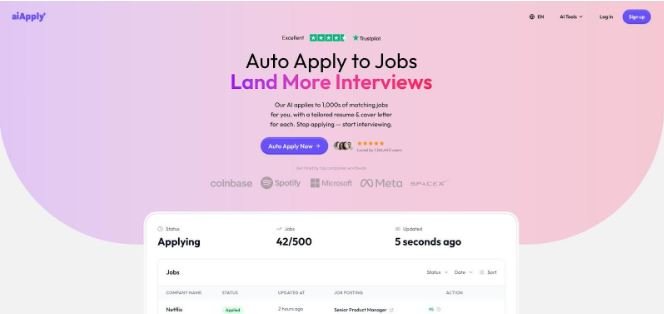
AIApply auto-apply job bot dashboard screenshot.
According to usage data highlighted by the AIApply auto-apply bot, candidates who let the tool rebuild their résumé and cover letter are roughly 80 percent more likely to land interviews than applicants who fire off a static PDF. That evidence is why the platform feels less like a script and more like a junior recruiter who never sleeps; after a five-minute setup it scans fresh listings, tailors documents, and submits them with human-paced timing.
The dashboard keeps you in the loop. You see every job, its match score, and the custom document AIApply sends. If something looks off, you can pause or adjust keywords on the fly, so control never drifts out of your hands.
Safety is built in. AIApply spaces applications at human intervals and randomizes click paths, a strategy that helps accounts avoid LinkedIn’s Easy Apply limits. Pair that with a $74 monthly entry point for auto-apply features and a free trial, and you get higher-quality applications without the late-night copy-paste grind.
Bottom line: if you want volume without sacrificing craft, AIApply is the smartest first hire for your job search.
2. JobCopilot: best for high-volume with high fit
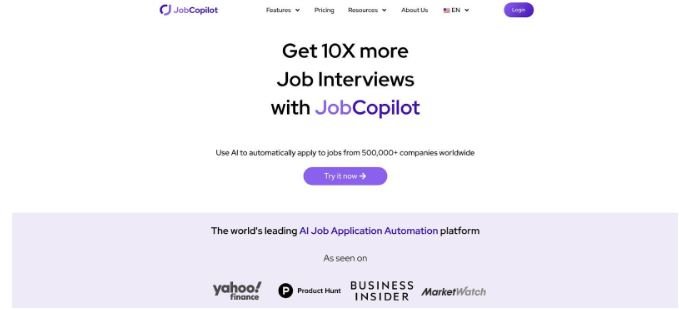
JobCopilot automated job application platform homepage screenshot.
JobCopilot behaves like a disciplined recruiter. Its crawler monitors more than half a million career pages and board feeds, flagging roles that match the skills and salary targets you set. You decide how many applications it sends each day. Most users cap it at 40 to 50, and the tool keeps that ceiling while spacing submissions so nothing triggers anti-bot alarms.
The real advantage is its match engine. Before an application moves forward, JobCopilot scans the description, scores relevance, and edits your résumé bullets to surface the exact keywords the hiring manager wrote. You end up in the “yes” pile not because you were first, but because you speak the role’s language.
Users back the claims. Trustpilot shows a 4.2-star average across more than 300 reviews (April 2026), signaling steady interview traction without surprises about billing or bans. Pricing starts at $38 a month, which sounds steep until you count the hours it saves and the dead-ends it filters out.
If you’re chasing large outreach numbers but refuse to settle for generic blasts, JobCopilot holds the middle lane better than anything else on the market.
3. LoopCV: best “set it and forget it” hunter
LoopCV is the closest thing to cruise control. You load your résumé, list preferred titles, salary bands, and locations, then hit start. The cloud crawler runs around the clock, scooping up fresh postings from job boards and company pages, submitting on your behalf, and emailing a daily digest of what went out.
Its edge is reach. LoopCV taps more than 50 niche sites that many bots skip, so remote contractors and international applicants see roles that never appear on LinkedIn. The downside is lighter personalization. It can attach a generic cover letter, but it will not rewrite bullet points like the premium players above.
Many users log in once a week just to tweak keywords and review outcomes, not to babysit settings. At $20 a month for hundreds of targeted submissions, the math works if you value hands-off volume over handcrafted detail.
Choose LoopCV when you are open to a broad range of positions and want applications flowing without daily oversight. Pair it with a manual tracker or Simplify for high-priority roles that need extra polish, and you cover both breadth and depth with minimal effort.
4. Sonara: best always-on background helper
Think of Sonara as the slow-drip coffee maker of job search. Set your parameters once, and it quietly brews new applications each night without asking for attention.
After you upload your résumé and choose role filters, Sonara hunts listings overnight, fills forms, and emails a morning recap. The pace is deliberate—about 24 submissions per day—so activity stays under platform radar and never feels spammy.
Personalization is light. Sonara tweaks a generic cover-letter template with job title and company name, but it does not rewrite résumé bullets. That restraint helps keep the subscription at $24 a month, and a low-cost trial lets cautious users test the waters.
User feedback paints Sonara as a “set-and-sleep” companion. Trustpilot shows a 3.7-star average across more than 200 reviews (April 2026), reflecting steady if modest interview returns.
Choose Sonara when you prefer a gentle, daily flow of applications instead of big bursts and can trade deep customization for clockwork reliability at a bargain price.
5. LazyApply: best for sheer volume (handle with care)
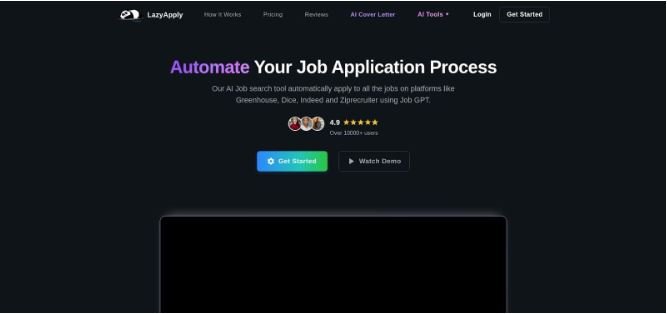
LazyApply mass auto-apply Chrome extension screenshot.
LazyApply is known for one thing: scale. Launch the Chrome extension, filter LinkedIn Easy Apply or Indeed by keyword, and watch it push through hundreds of postings in minutes. If your plan is to touch every opening in your field, nothing runs faster.
Speed comes at a cost. LazyApply sends the same résumé and canned answers every time, so recruiters spot the pattern. Trustpilot shows a 2.6-star average across roughly 250 reviews (April 2026), weighed down by reports of low reply rates and occasional form errors.
Risk matters more. Because the tool fires applications at machine speed, some users have received LinkedIn warnings after daily limits peak. LazyApply has no built-in throttling, so you must set a rational batch size and spread runs across the week.
Still, for entry-level seekers who value reach over polish, or for agencies that apply on behalf of many junior candidates, the $99 annual license is the lowest-cost path to blanket the market. Use it with a secondary LinkedIn account, and save manual care for the roles that shape your career.
6. Sprout: best mobile wingman for quick applications
Sprout flips the usual desktop workflow. Instead of tying you to a browser extension, it lives on your phone and turns idle moments into fast wins. Waiting for coffee? Scroll through roles, tap Apply, and the app autofills every field from your saved profile.
Mobile-first design is more than a novelty. The interface feels like swiping through playlists, and its AI adjusts résumé keywords just enough to avoid the stigma of one-size-fits-all autofill. While tailoring is lighter than AIApply or Jobright, it still beats manual forms.
The numbers back it up. More than 700 000 job seekers have downloaded Sprout, and the App Store shows a 4.8-star average across 15 000 reviews (April 2026). Users praise the clean experience and the way it captures pockets of free time.
Sprout is not built for marathon bulk sessions, and its edits cannot match the deep rewrites of premium bots. Yet for anyone who prefers to manage a job hunt from a pocket device—or who wants to reclaim commute minutes—it is a smart sidekick that keeps applications flowing without ever opening a laptop.
7. Jobright: best for shaping your story and tapping referrals
Jobright narrows the gap between automation and networking. It autofills forms and rewrites your résumé line by line to mirror the job description, but it also scans your LinkedIn connections to spot insiders at the target company. One tap, and you can request a warm intro while the bot handles the paperwork.
The rewrite engine is sharp. It highlights missing keywords, suggests stronger verbs, and even reorders sections so the most relevant details rise to the top. For career changers or senior specialists juggling multiple skill sets, that fine-grained edit can mean the difference between “rejected by ATS” and “recruiter follow-up.”
Jobright keeps you in control. Applications sit in a queue until you approve them, which prevents accidental spam and lets you review any odd tweaks before they go live. The extra step slows throughput to about 40 submissions a day, but interview returns trend higher than pure volume tools.
Trustpilot shows a 4.6-star average across more than 180 reviews (April 2026). Pricing starts at $40 a month, and a free tier lets you test basic autofill. If you care about narrative control and believe relationships still influence hiring, Jobright offers the most thoughtful blend of AI precision and human touch.
8. Simplify: best free autofill for error-free manual submissions
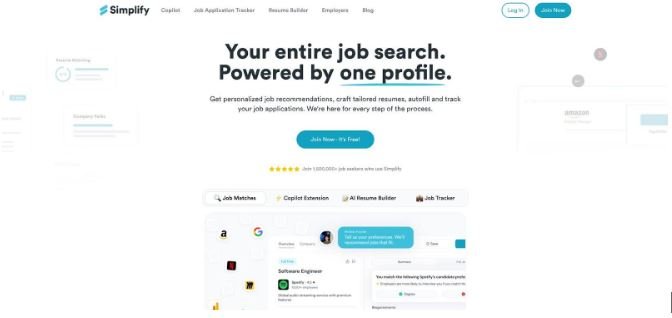
Simplify is not a true auto-submit bot, and that is its advantage. The free browser extension recognizes hundreds of ATS fields, drops in your saved answers, and then pauses so you can click the final button yourself.
That split-second review matters. You can catch misaligned salaries, visa questions, or duplicate applications before they leave your desk. Recruiters still see a human touch, and LinkedIn’s filters have nothing to flag because the click comes from you.
Power users praise the memory feature. Once you answer a custom question such as “Why do you want to work here?”, Simplify stores it, so the next form preloads your best response. You tweak a word or two, hit submit, and move on. Over dozens of apps, those seconds add up to hours.
Because it never violates site terms, Simplify is the safest pick for high-stakes roles where a single mistake or ban could sting. App Store reviews average 4.9 stars across 12 000 ratings (April 2026). Use it on its own if you prefer manual search, or pair it with LoopCV or Sonara to speed through forms those bots miss. Either way, the cost stays at zero dollars for core autofill, with optional pro tracking if you want richer analytics.
9. OutApply: best for human-in-the-loop quality control
OutApply takes a measured approach to automation. The AI scans a posting, scores your fit, rewrites your résumé to close obvious gaps, and drafts a cover letter—then pauses. Nothing leaves your screen until you skim the packet and tap Approve.
That thirty-second checkpoint solves two headaches. First, it prevents embarrassing misfires like applying to a senior role with an intern résumé. Second, it keeps platform risk near zero because you still click the final button. LinkedIn has yet to flag an OutApply user for bot behavior.
The fit-score dashboard also shines. Each job shows a percentage match and a short list of missing keywords, so every review becomes a quick lesson in what to upskill or highlight.
Throughput is lower; you will clear roughly a dozen high-quality applications during a focused hour. Candidates report stronger callback rates because each résumé aligns closely with the posting. Trustpilot lists a 4.2-star average across about 160 reviews (April 2026). With pay-per-use pricing and a generous free tier, OutApply suits senior professionals and career switchers who want precision over volume while still letting AI handle the heavy lifting.
10. FastApply: best Chrome extension for broad site coverage
FastApply lives in your browser and automates applications across more than 100 job boards and applicant-tracking systems, including Workday and Greenhouse. After you set preferences and upload a résumé, the AI rewrites your documents for each role and submits them while the tab stays active.
That broad reach pays off. FastApply handles mainstream sites like LinkedIn and Indeed, but it also works on many company career pages that trip up simpler bots. If you are a tech professional or data analyst casting a wide net, that flexibility is hard to match.
The trade-off is that your browser must remain open while the queue runs. High-volume seekers rarely mind; the extension can push up to 250 applications per day when you need a burst.
At $14 a month, it joins the bargain tier, and the free plan lets you test five applications before paying. Trustpilot lists a 3.5-star average across about 120 reviews (April 2026). Pair FastApply with manual networking and you will cover every corner of the market without surrendering quality.
Tips for using job-apply automation safely
Automation saves hours, but the wrong settings can cost you an account or a dream offer. Keep these guardrails in place and you will reap the upside without stepping on rakes.
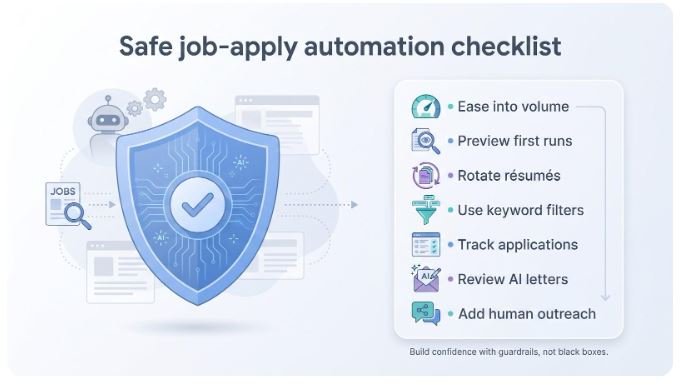
Ease into volume. LinkedIn now throttles Easy Apply activity; crossing the soft cap in a single burst can trigger a “verify your identity” roadblock. Space applications over the day, or let your bot’s scheduler handle timing.
Always preview the first few submissions. Check that salary fields, relocation answers, and work-authorization boxes read exactly as you intend. A single bad flag can sink you in an ATS for months.
Rotate résumés for different role families. Feeding a sales résumé to a data-engineering post signals automation. Store two or three focused versions and map them to matching keyword sets.
Use keyword filters, not blind boards. Tell the bot to include “visa sponsorship” or “C2C” when relevant, and exclude internships if you are senior. Quality starts with the search query.
Track everything. Whether your tool offers a dashboard or you use a free tracker like Huntr, log each application. When a recruiter calls, you need to recall which résumé and cover letter they saw.
Review AI-written letters before they ship. Generative models can invent projects you never completed. A 30-second skim protects your credibility.
Mix automation with human outreach. Follow up priority applications with a short LinkedIn message to the hiring manager. Bots open doors; personal notes keep you in the room.
Conclusion: automate smart, apply wisely
Job-apply bots are not shortcuts to skip work; they are amplifiers. When you give them clear goals, focused résumés, and sensible daily limits, they turn a tedious chore into a steady pipeline.
Start with one tool, ideally a free tier, to learn the rhythm. Watch how recruiters respond, refine your résumé data, and scale only when results improve. Whether you choose AIApply for precision, LazyApply for reach, or Simplify for zero-risk autofill, the real win is time reclaimed for interview prep, networking, and skill building.
Use the rankings and safety tips above as a launchpad, but keep tuning settings until the numbers on your tracker move from “Applied” to “Interview.” When that first call arrives, you will know automation did its job: opening doors so you can walk through them prepared.
Happy hunting, and may your next “Congratulations, you are moving forward” email arrive sooner than expected.
