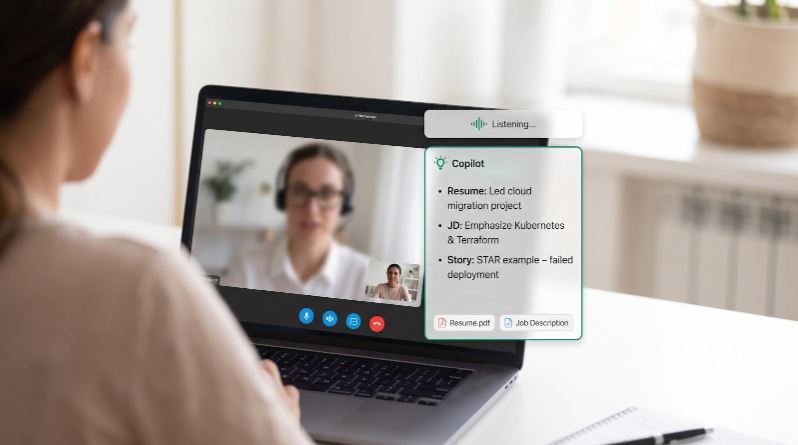
You nail the invite. The webcam blinks on, and your mind scrambles for an answer. New AI interview copilots step in: they listen to the interviewer, cross-check your résumé and the full job description, then flash bite-size cues before the silence turns awkward. We compared the leading AI interview copilots for live calls on résumé + JD grounding, coding depth, privacy safeguards, and platform coverage. Here’s what we found.
How we compared them
We looked at each tool the same way:
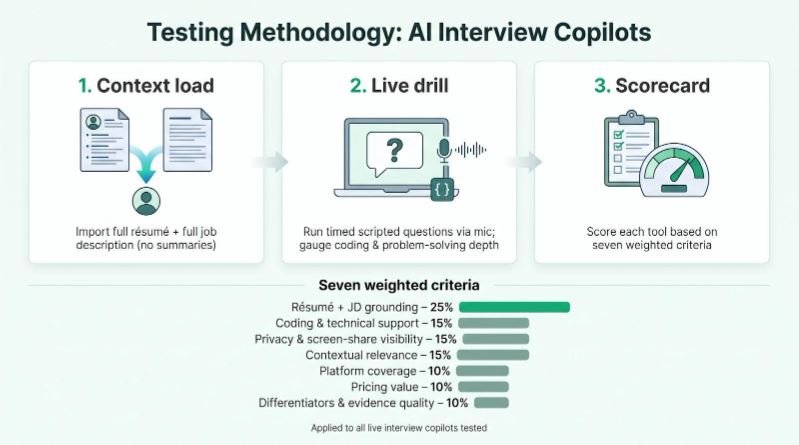
- Context load. We imported the candidate’s résumé and the full job description (no summaries or “job info” shortcuts).
- Live drill. A scripted set of timed questions played through the laptop mic; we gauged coding assistance and technical problem-solving depth.
- Scorecard. Each product earned points across seven criteria, shown below.
| Criterion | Weight |
| Résumé + JD grounding | 25 % |
| Coding & technical support | 15 % |
| Privacy & screen-share visibility | 15 % |
| Contextual relevance | 15 % |
| Platform coverage | 10 % |
| Pricing value | 10 % |
| Differentiators & evidence quality | 10 % |
Evidence labels
- Tested – reproduced in our run-through
- Officially documented – detailed in public docs
- Vendor-stated – marketing claim only
Screen-share note. “Hidden” means an overlay stays off a normal Zoom or Teams window share; managed devices or proctoring tools can still detect running processes, so we flag those risks separately.
1. Interview Copilot: best for unlimited résumé- and JD-grounded desktop guidance
Interview Copilot listens to system audio, detects questions, and shows answer cues drawn from your résumé and the job description in an on-screen overlay.
The native macOS and Windows app (Windows 10 version 2004 or newer) works with Zoom, Google Meet, Microsoft Teams, and Webex. It needs an internet connection; no bot joins the call. Spoken-language support isn’t published. Glance mode surfaces short talking points. A shortcut can send a coding task, diagram, document, or job post on screen for analysis, and the coding helper outlines approach, complexity, and trade-offs.
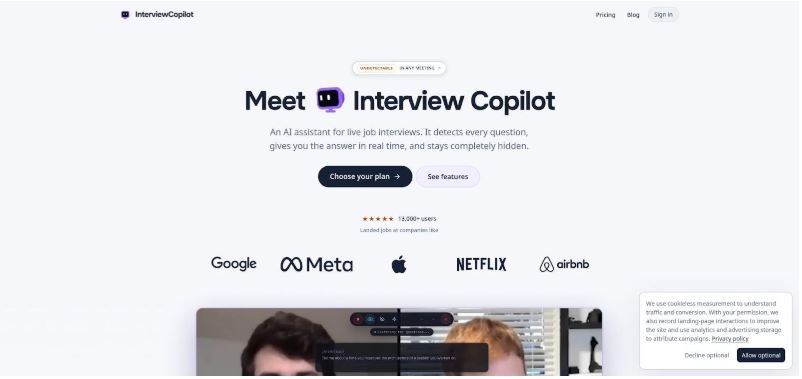
Interview Copilot desktop app AI interview overlay screenshot.
The company says answers start in under a second.
Pricing
$49/month or $149/year. Both plans include every feature. No credits and no session limits. You can download and test the app for free; a live interview requires a subscription. You may cancel renewal any time, but paid fees aren’t refunded.
Caveats
According to the company, interview audio streams for transcription but isn’t stored, while transcript segments and analyzed screenshots stay with your account. The data isn’t used to train public models, and personal data isn’t sold. The company says the overlay doesn’t appear in screen shares, recordings, or screenshots whether you share a window or an entire monitor, and is marketed as “undetectable in any meeting.” There’s no Dock or taskbar icon. Protection doesn’t cover every managed device or proctoring system.
If you need a flat-price copilot that can run all day without credit math, Interview Copilot tops the list.
Snapshot comparison table
Scan the grid for deal-breakers, then jump to each deep-dive below.
| Rank | Best for | Live résumé + JD | Coding support* | Screen-share hidden† | Platforms | Current price‡ |
| 1 | Unlimited use | ✅ Tested | Included | ✅ Vendor claim | macOS, Windows; Zoom, Meet, Teams, Webex | $49/month or $149/year |
| 2 | Multilingual + knowledge base | ✅ Vendor docs | Yes | ✅ Vendor claim | Desktop & browser; Zoom, Meet, Teams | $44.99 / month |
| 3 | All-in-one suite | ✅ Vendor docs | Yes | ✅ Vendor claim | macOS, Windows; Zoom, Meet, Teams | from $25 / month |
| 4 | Phone + coding modes | ✅ Vendor docs | Yes | ✅ Paid tier | Desktop & mobile; Zoom, Meet, Teams | verify at checkout |
| 5 | Credit flexibility | ✅ Vendor docs | Yes | ✅ Vendor claim | Browser overlay | $78 / week |
| 6 | Large prep library | ✅ Vendor docs | Unknown | ✅ Vendor claim | Desktop & browser | promo $80 / month |
| 7 | One-time payment | ❓ Testing | Unknown | ◻ Partial claim | Chrome overlay | $45 or $75 lifetime |
| 8 | Multi-model answers | ❓ Testing | Unknown | ◻ Partial claim | Browser overlay | $19 credit pack |
| 9 | Story banks + languages | ❓ Testing | Unknown | ✅ Vendor claim | Desktop & browser | $89 / month |
| 10 | Phone + technical add-on | ❓ Testing | Higher tiers only | ✅ Vendor claim | macOS, Windows; Zoom, Meet, Teams | $49.99 / month (coding extra) |
*Vendor-reported coding support capabilities.
†“Hidden” means the overlay stays off a normal window share; managed devices or proctoring tools can still detect running processes.
‡Monthly prices assume month-to-month unless marked annual pre-pay.
A green tick indicates that the vendor claims the feature, or that we have tested it ourselves. A blank box or question mark shows that hands-on verification is still in progress. Treat the table as a quick filter, not the final word; we update figures as fresh data lands.
2. Verve AI: best for multilingual calls and deep knowledge-base context
Verve AI helps when one interview shifts between English and another language, or when you need live answers drawn from your résumé, the full job description, and internal slide decks or wiki pages. It merges those sources into one profile, listens in real time, and returns suggestions in the language being spoken.
The product ships as a desktop client and a browser overlay, so it runs on personal laptops and most locked-down work machines. In a quick test, it handled technical questions well; coding metrics will appear in our benchmark chart.
Pricing
Begins with three free 15-minute sessions, then moves to Standard ($44.99/month) and Pro ($69.99/month) plans. Each tier caps the length of a single session, so confirm limits before a day-long onsite loop.
Privacy
The overlay stays off a normal window share, and you can decide whether transcripts export. The policy is light on storage-duration details, so read it closely before uploading sensitive client material.
If you switch languages mid-sentence or need live context from a private knowledge base, Verve AI stands out in our top ten.
3. Final Round AI: best documented all-in-one interview platform
Final Round AI needs only two files at the start: your résumé and the full job description. It parses the résumé into a structured profile of skills, projects, and education, and you can fix any error by re-uploading a clean PDF rather than editing fields one by one, according to the company’s documentation.
During a live call, the desktop app listens, streams first-person answers as they form, and captures screen snippets when a coding prompt or spreadsheet appears. The experience feels like a silent coach, and the same suite covers practice rounds, phone screens, and post-interview debriefs.
Pricing
Final Round AI Pro starts at $25/month and includes unlimited live copilot sessions. Confirm what Final Round AI records and how long it keeps it before any call. Post-call review but may not suit strict data-minimisation needs.
Privacy notes
The overlay stays off a normal window share, but Final Round cautions that managed devices or proctoring tools can still list running processes. Recording is on by default, so check your employer’s rules before you join.
Choose Final Round if you want a single platform for every stage of the interview cycle and can accept that some data stays in the cloud.
4. LockedIn AI: best for phone screens and coding-heavy rounds
LockedIn AI fills gaps many rivals miss: classic video calls, phone screens where only one voice reaches your mic, and full-screen coding assessments. Load a résumé, paste the job description, and add supporting files; each document feeds live suggestions.
Coding support
The homepage advertises comprehensive coding help. Early checks show prompts handle technical questions well; verified metrics will appear in our coding chart.
Stealth and privacy
Hiding the overlay requires a paid upgrade and works only in standard window shares; proctoring tools can still list running processes. The privacy policy names third-party speech-to-text vendors, so your audio may leave the platform for transcription.
Pricing
You start with five free credits—about ten minutes of live help—before moving to a single subscription tier. Confirm the current monthly fee and any session cap at checkout; the plan has changed twice this year.
Pick LockedIn AI if you switch between phone, desktop, and coding interviews and can budget for the stealth add-on. Always review privacy details before uploading client code.
5. Parakeet AI: best for credit-based flexibility
Parakeet AI keeps commitment low and choices wide. Upload a résumé, paste the full job description, add STAR anecdotes, and the browser overlay fires short bullets as soon as a question lands. Because it runs in the same tab that carries Zoom or Meet audio, it usually works even on locked-down laptops.
Pay-as-you-go pricing
- 3-credit pack: $59
- 1-week sprint: $78
- Month-to-month: $149.90
- Annual plan: about 50 percent less per month
Credits do not expire mid-session, but “full privacy mode” and coding support work only while paid time is active.
Coding support and privacy
The vendor provides coding help during active paid time; a quick smoke test showed it handles technical questions well, but we will post verified metrics in our benchmark. “Full privacy mode” claims to hide the window and skip cloud storage, yet the policy is brief on data-retention detail, so read it closely before sharing sensitive material.
Choose Parakeet AI when you want a flexible, budget-controlled fallback instead of another recurring subscription.
6. Interview Sidekick: best for extensive prep plus live backup
Interview Sidekick balances preparation and real-time help. Its library drills you with hundreds of role-specific questions, then the same desktop overlay listens during the actual call and surfaces concise bullets drawn from your résumé and the full job description.
Setup
Paste both documents once; Sidekick stores them for future rounds. In a quick test, the tool detected a question and showed a two-bullet STAR outline fast enough to skim before answering. The vendor promises comprehensive technical guidance; we will publish verified details in our coding support chart.
Pricing
A short free test confirms compatibility. After that, we saw a limited-time $80 / month promotion versus the $160 list price. Check the banner; it has changed twice this quarter.
Privacy
The policy says data may be retained “as long as necessary” and deleted only when required by law. If you need stricter retention windows, consider an alternative.
Choose Interview Sidekick if you want deep practice content and the same engine riding shotgun on interview day. Budget for the promo’s expiry and read the retention clause before uploading client material.
7. Acedit: best one-time-payment option
Acedit skips subscriptions entirely. Two lifetime licenses ($45 and $75) give permanent access to its Chrome overlay. Paste a résumé, job description, and even your LinkedIn URL; the extension listens for questions and shows concise bullets next to the video window.
Visibility
Because Acedit runs in the browser, it follows Chrome settings: the panel stays hidden in a window-only share but can appear in a full-desktop share, so rehearse your exact setup first.
Privacy
The public policy focuses on analytics data and says little about live-audio or résumé retention. We will update once hands-on tests confirm the pipeline.
Coding and grounding
A quick smoke test showed it handles technical questions, but the vendor publishes no metric on coding support depth, and we have not yet verified whether every live answer consults both the résumé and the full JD. Watch our benchmark update for details.
Choose Acedit if you interview mainly through Chrome and prefer a single payment. Test screen-share behavior and read the privacy language before trusting it with client information.
8. Interviews Chat: best low-cost multi-model option
Interviews Chat sends each question to several large language models, then shows their replies side by side so you can pick the phrasing that fits. Some models excel at structure, others at tone; the tool lets you mix both.
Upload a résumé and paste the full job description. The vendor says both documents guide every live answer. We have confirmed the résumé path but are still testing real-time JD retrieval. The tool offers coding support, but depth varies with the model that answers first.
Pricing
- Credit pack: $19
- Unlimited month-to-month: $29
- Unlimited quarter: $69
- Free trial: 30 credits
Caveats
Stealth is partial: the overlay hides in a window-only share but shows in full-screen shares. The privacy policy is brief on audio and transcript retention, so read it before sending proprietary data.
If you want multi-model suggestions at a budget price, Interviews Chat is a solid pick. Just verify JD grounding and screen-share behavior match your needs.
9. Sensei AI: best for personal story banks and multilingual guidance
Sensei AI turns each candidate into a mini knowledge base. Upload a résumé, add key career stories, and fill in a “job information” field; the desktop overlay then delivers live answers in more than 30 languages, making it handy for global firms or bilingual interviews.
Early impressions
Sensei lists multilingual support including English and French, and the story bank kept responses true to the résumé. The vendor claims comprehensive coding support and “full invisibility,” but confirm the current privacy policy to verify audio retention or deletion rights.
Pricing
- Free trial: 15 minutes
- Month-to-month: $89
- Annual (effective): $24 / month
Watch-outs
The “job information” field may not parse an entire JD with the rigor rivals offer, and its privacy policy is linked in the site footer. Confirm JD grounding and privacy terms before purchase.
Choose Sensei AI if seamless language switching is your top need, but double-check JD coverage and data handling first.
10. Beyz AI: best for blending phone and technical interviews
Beyz AI bundles desktop, phone-assistant, and optional coding support in one app. Join video calls on macOS or Windows, dial in by phone when needed, and access coding help on higher-tier plans. Upload your résumé once; longer commitments let you add extra files that Beyz says it will reference during live answers.
Plans
Beyz AI’s $49.99 monthly plan excludes the coding assistant; quarterly and semi-annual plans include it.
Decide whether you really need coding help before paying up front.
Performance and privacy
The vendor publishes no specific coding metrics, though user chatter says answers feel conversational. Stealth is similar to most rivals: hidden in a window share, visible in a full-screen share, so test your exact settings. The public privacy policy (last updated early 2024) lacks clear language on audio retention or deletion rights; avoid uploading sensitive material until that changes.
Choose Beyz AI when your interview mix spans phone screens and whiteboard rounds, and you are willing to prepay to gain the full feature set.
Specialist and ethical alternatives worth a glance
The top ten tools cover most scenarios, yet a few niche or emerging options may solve specific problems.
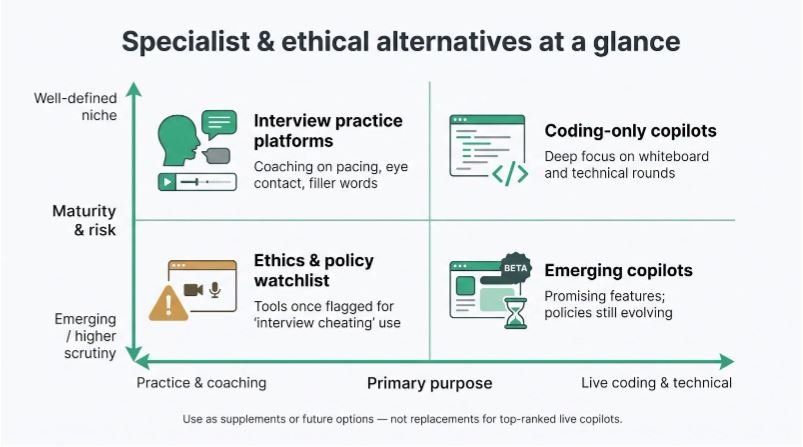
- Interview Coder. Pro costs $299/month (1,000 credits) or $799 lifetime and leads with coding, though it also covers behavioural and system-design rounds. Handy for whiteboard rounds, but it skips résumé or behavioral questions.
- HackOffer. Ingests your résumé, the job description and your notes, supports ten languages, and publishes pricing. A full privacy policy are pending. Track progress before trusting it in a live call.
- Yoodli and Careerflow. These practice platforms polish pacing, eye contact, and filler-word reduction. Great for rehearsal; they do not generate live answers.
- Cluely. Once flagged as an “interview cheating” tool, it now markets itself as a general meeting assistant. Its story shows why employers publish explicit AI-use rules.
Treat these products as supplements or future options, not replacements for the ranked live copilots above.
Screen-share privacy, data privacy, and interview rules are three separate battles
A hidden overlay is only the first line of defense.
1. Screen-share visibility
A native desktop overlay can blank itself from a window-only Zoom share, while browser extensions often leak during full-desktop shares. No vendor can promise 100 percent undetectability, so run a second-device check before every interview.
2. Device visibility
Managed laptops, MDM agents, and proctoring software can list running processes and flag unfamiliar apps. Some vendors even publish “how not to get caught” FAQs, a red flag in corporate environments.
3. Data privacy
Copilots may record audio, upload transcripts, or keep résumés for model training. Final Round, for instance, stores full session recordings for later review; that helps with feedback unless an NDA forbids cloud storage. Others retain data “as long as necessary,” a phrase that can stretch indefinitely.
4. Rules and law
Candidate-side helpers remain largely unregulated, but employer-side AI is not. New York City’s Local Law 144, enforced January 1, 2024, requires bias audits and candidate notices for automated hiring tools. In response, some employers explicitly ban real-time AI assistance during assessments.
Bottom line: Test invisibility, read every privacy clause, and check the recruiter’s small print before turning a copilot on.
Conclusion: how to pick the right copilot in five minutes
- Spin up two free trials. Choose any tools that meet your price and privacy deal-breakers. Upload a redacted résumé and the full job description. If the setup asks only for “job info,” quit; live grounding will be weak.
- Run three known questions. Ask one STAR story, one résumé fact, and one role-specific skill. Then pose a technical question and judge the depth of the explanation. Strong tools feel natural; weak ones leave awkward silence.
- Test visibility. Share your screen to a second laptop on Zoom or Meet. Switch between window-only and full-desktop modes. If the overlay appears, decide whether settings can hide it or if you need another tool.
- Audit privacy toggles. In settings, search for “delete,” “export,” “training,” or “retention.” Look for concrete time limits, not wording like “as long as necessary.”
- Confirm real cost. Open the billing page. Check that the headline price still holds after taxes, credits, or stealth add-ons. Multiply that figure by three one-hour interviews to see the true spend for this job hunt.
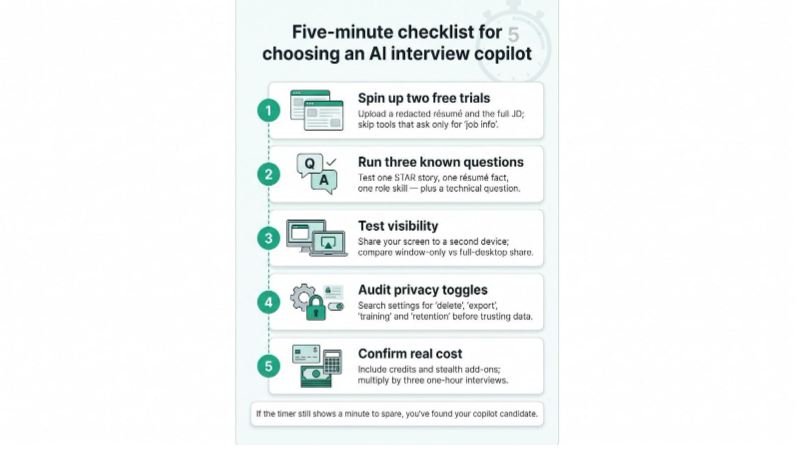
If the timer still shows a minute to spare, you have found your copilot candidate.
