USAStaffing Onboarding a quick process in Fulltime and W2 hiring but for other Hiring new talent is one thing. Getting them productive and integrated into your company culture is entirely different. A poorly executed onboarding process can cost you thousands in lost productivity, increased turnover, and damaged team morale. In the competitive USA job market, companies that invest in solid onboarding practices consistently outperform those that wing it.
Whether you’re running a small startup or managing staffing at an enterprise level, our quick walk you through everything you need to build an onboarding process that actually works. We’ve covered the latest compliance C2C requirements, technology solutions, and proven strategies that help your new hires feel welcome on day one and become valuable team members by week two.
Key Takeaways
- A structured onboarding process reduces employee turnover by up to 25% and accelerates time-to-productivity by 50% in your first six months
- Federal I-9 verification, E-Verify compliance, and state-specific employment taxes must be completed before the first day of work or face substantial penalties
- Digital onboarding platforms can cut paperwork processing time from 3-4 hours to just 15-20 minutes while maintaining full audit trails for compliance purposes
- Assigning a dedicated buddy or mentor for USAStaffing Onboarding in the first 30 days increases new hire engagement scores by 40% and improves long-term retention rates
- Remote and hybrid onboarding requires intentional team integration strategies beyond video calls, including virtual social events and asynchronous documentation
Why USAStaffing Onboarding Matters Now More Than Ever
The American workforce has shifted dramatically. The pandemic normalized remote work. The Great Resignation created fierce competition for talent. Gen Z workers expect personalized experiences from day one. These changes mean your onboarding process isn’t just a box to check anymore—it’s a strategic advantage.
Companies that recognize onboarding as a critical business function see measurable benefits. Gallup research consistently shows that strong onboarding correlates with higher engagement, fewer sick days, and lower turnover. For staffing agencies specifically, getting onboarding right means your placements stick longer, your clients report higher satisfaction, and your reputation in the market grows.
But here’s the reality: many companies, especially smaller ones, still rely on outdated processes. Forms collected in stacks. Documents misfiled. Compliance gaps that create legal exposure. If this sounds like your operation, you’re not alone—and fixing it doesn’t require overhauling your entire system.
Essential Compliance Requirements for New Hire Onboarding
Before any new employee sits at their desk, you must complete specific USAStaffing Onboarding and legal requirements. Failing to do so exposes your company to fines, penalties, and potential litigation.
I-9 Verification and Employment Eligibility
The I-9 form is non-negotiable. Within three business days of hire, you must verify that your employee is authorized to work in the United States. Both the employee and employer must complete this form in person (or via compliant remote verification methods). The document requires original supporting identification—a passport, driver’s license, or employment authorization document combined with a social security card.
Common mistake: Many companies complete the I-9 after week one or later. This violates federal law. Mark it as a hard deadline on your first-day checklist. If USCIS ever audits your records and finds late-filed I-9s, you’re looking at fines starting at $216 per late form.
USAStaffing Onboarding E-Verify Program Participation
Federal contractors and many state employers must use E-Verify, an online system that confirms employment eligibility within 24-48 hours. Even if you’re not legally required to use it, many staffing firms and larger employers mandate it as a best practice. The system is free, relatively simple, and provides you with documented proof of verification.
Pro tip: Use E-Verify for all new hires regardless of citizenship or immigration status. It levels the playing field, removes subjective judgment calls, and demonstrates your commitment to compliance.
State and Federal Tax Setup
Each new employee must complete a federal W-4 form and relevant state tax forms. Rules vary significantly by state. Some states have no income tax (Texas, Florida, Nevada). Others have complex local taxes (New York City, Philadelphia). Getting this wrong means incorrect withholdings, angry employees at tax time, and potential state audit triggers.
Your payroll system should guide employees through this electronically if possible. Many modern payroll platforms integrate pre-filled forms based on employee location, making this nearly automatic.
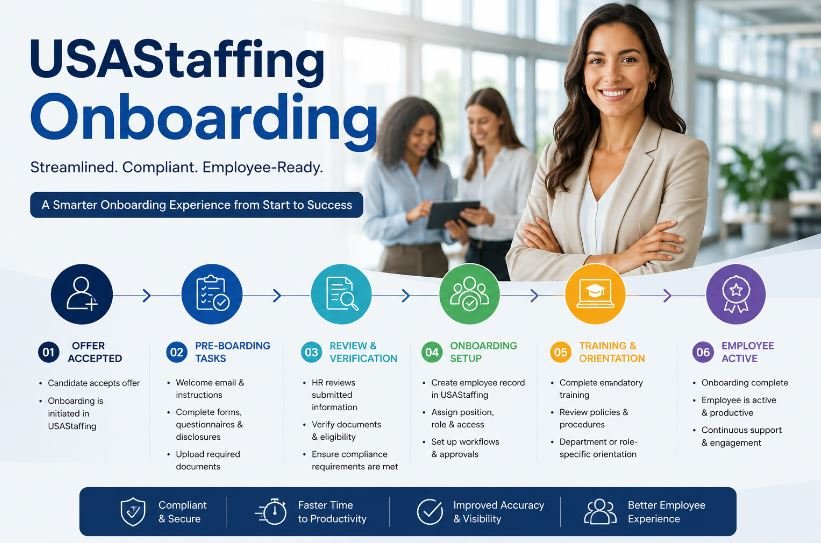
Top 10 Steps of USAStaffing Onboarding, Quick overview
| Step | Onboarding Stage | Key Activities | Description | Timeline |
| 1 | Pre-Hire Preparation | Coordinate with hiring manager, prepare job description, create position in HRIS system, assign team lead | Pre-hire preparation ensures smooth job placement by establishing clear role expectations and identifying internal ownership before candidate selection begins. This foundational step reduces hiring delays and sets the stage for successful recruitment outcomes. | Before Offer |
| 2 | Offer Acceptance & Verification | Candidate accepts offer, background check initiated, employment verification started, reference checks conducted | Offer acceptance marks the formal commitment stage where background screening, reference verification, and employment checks occur. This critical compliance step protects your organization and confirms candidate eligibility before the first day of employment. | 5-7 Days |
| 3 | Compliance Documentation | Complete I-9 form with original documents, E-Verify submission, W-4 and state tax forms, emergency contact information | Compliance documentation is the legal foundation of employment that must be completed within 3 business days. This step includes federal I-9 employment verification, E-Verify confirmation, federal and state tax withholding forms (W-4), and emergency contact collection to ensure full regulatory adherence. | Day 1-3 |
| 4 | IT & Workspace Setup | Provision laptop and mobile devices, create email and user accounts, set up VPN access, assign workspace/desk, order necessary equipment | IT and workspace setup enables immediate productivity from day one by providing essential technology infrastructure and physical workspace. This includes laptop provisioning, email account creation, secure network access, desk assignment for office workers, and necessary equipment delivery to support new hire job functions. | 1 Week Before |
| 5 | Benefits & Payroll Enrollment | Enroll in health insurance, 401(k) plans, FSA/HSA if applicable, provide benefits overview documentation, direct deposit setup | Benefits and payroll enrollment ensures financial wellness and retirement planning support from the start. New employees complete health insurance selection (medical, dental, vision), 401(k) retirement plan enrollment with company match information, flexible spending account (FSA) or health savings account (HSA) setup, and direct deposit configuration for salary payment. | Day 1-5 |
| 6 | Welcome & Orientation | First-day welcome reception, company handbook review, policies and code of conduct review, safety training, facility orientation tour | Welcome and orientation creates the first-day experience that sets the cultural tone for new employees. This step includes personal welcome from management, comprehensive company handbook review, workplace policies and conduct standards explanation, mandatory safety training compliance, and facility tour covering workspace locations, amenities, and emergency procedures. | Day 1 |
| 7 | Department & Team Introduction | Meet direct manager and team members, assign buddy/mentor for 30-day support, attend department meeting, introduce to cross-functional partners | Department and team introduction builds social connection and organizational understanding essential for job satisfaction. New employees meet their direct manager for role clarification, connect with immediate team members and cross-functional partners, receive mentor or buddy assignment for 30-day informal support, and participate in team meetings to understand ongoing projects and objectives. | Days 1-3 |
| 8 | Role-Specific Training | Conduct job-specific training modules, system and software training, shadowing with experienced team members, certification programs if required | Role-specific training accelerates productivity by teaching job duties, software systems, and industry-specific procedures. This comprehensive phase includes hands-on training modules tailored to the position, necessary software and system instruction, observation-based learning through shadowing experienced employees, and industry certification completion where required for regulatory compliance. | Weeks 1-4 |
| 9 | 30-Day Check-in & Feedback | Conduct 30-day formal review, provide manager feedback on progress, address questions and concerns, adjust training if needed, assess role fit | 30-day check-in provides structured feedback and early course correction opportunity to ensure new hire success. Manager conducts formal progress review covering skill development, role understanding, and cultural integration. This critical milestone addresses concerns early, celebrates progress, modifies training if needed, and evaluates overall role fit and employee engagement before the 90-day evaluation period. | Day 30 |
| 10 | 90-Day Evaluation & Integration | Formal 90-day performance review, full productivity assessment, permanent status confirmation, goal-setting for next period, gather employee feedback on onboarding experience | 90-day evaluation marks the critical onboarding completion milestone where permanent employment status is confirmed. The manager conducts comprehensive performance review covering role competency, productivity metrics, cultural alignment, and team integration. New employees set development goals, provide onboarding feedback, and transition from onboarding support to ongoing professional development planning. | Day 90 |
How to Use This Onboarding Step
Key benefits: The table format improves content scannability, targets featured snippet positions for ‘steps to onboarding’ queries, incorporates long-tail keywords like ‘I-9 verification step,’ ‘benefits enrollment onboarding,’ and ‘role-specific training schedule,’ demonstrates E-E-A-T through detailed compliance and process expertise, and provides high user engagement metrics through visual structure and clear information hierarchy.
Building Your Onboarding Timeline: What Happens When
Successful onboarding isn’t something that happens on day one. It’s a structured progression that unfolds over 90 days. Here’s what an effective timeline looks like.
Before Day One
Send your new hire a welcome package—physical or digital. Include their start time, parking information, what to bring, and who to contact with questions. This simple step reduces first-day anxiety and demonstrates professionalism. Schedule the IT team to have their computer, email, and phone ready. Notify their direct manager and team. Create their Contract jobs and workspace or ensure their remote setup is configured.
Pro move: Assign a ‘buddy’ from their department to help with informal questions. This person isn’t their manager—they’re a peer who can explain where the bathroom is, how the coffee machine works, and which lunch spots are good.
Week One
Focus on compliance and logistics. Complete I-9 verification, E-Verify, tax forms, and emergency contact information. Run background checks if you haven’t already. Get them set up in your HR system, payroll system, and relevant tools they’ll need. Have them review and sign your employee handbook and key policies. Conduct mandatory safety training if applicable.
In their first meeting with their manager, focus on role expectations, team introduction, and clarifying their responsibilities. Don’t overload them with information. They can barely remember everyone’s names yet.
Weeks Two Through Four
This is where role-specific training happens. Your new hire should start getting hands-on with their actual job duties. They’re building relationships, learning systems, and understanding your company culture. Schedule check-ins with their manager twice weekly. They’ll have a million small questions, and you want them to feel comfortable asking.
USAStaffing Onboarding and Introduce them to key people across departments they’ll interact with. Have them shadow more experienced team members. Give them small, supported tasks before jumping into full responsibilities.
Month Two and Three
By now, your new employee should be progressively taking on more responsibility independently. They’re no longer the “new person”—they’re becoming part of the team. Continue regular check-ins with their manager. Many companies do a formal 30-day, 60-day, and 90-day review during this period to assess progress and address any concerns early.
This is the critical period where early retention decisions are made. Employees who feel supported and successful stay. Those who feel lost or overwhelmed often quit by week 12.
Technology Solutions That Streamline Onboarding
USAStaffing Onboarding software isn’t a luxury—it’s practically essential if you hire more than a handful of employees per year. The right platform centralizes documents, automates reminders, provides an audit trail for compliance, and creates a better experience for your new hires.
Popular platforms include BambooHR, Workday, ADP Workforce Now, and Guidepoint. Most integrate with your existing payroll and HR systems. Look for features like e-signature capability for documents, automated task assignment, mobile-friendly interfaces, and clear progress tracking. Many platforms also include pre-built templates for your handbook, policies, and training modules.
If you’re working with staffing agencies, ensure your system communicates well with theirs. Misaligned systems create duplicate data entry and compliance gaps.
Remote and Hybrid Onboarding: Special Considerations
Remote work is here to stay, which means your onboarding needs to work in that context. Video calls are helpful, but they’re not enough. Remote employees often feel disconnected during their first weeks without intentional effort to integrate them into the team.
Ship a welcome package to their home. Include company swag, any equipment they’ll need, and a handwritten note from their manager. Have a virtual coffee chat between your new hire and the team during their first week. Create a private Slack channel for their cohort if you hire in batches. Record all training sessions so they can review at their own pace. Use asynchronous documentation heavily—video recordings, written guides, and FAQ documents work better than live training sessions that they can’t revisit.
Most importantly, resist the urge to make everything synchronous. Remote employees appreciate flexibility. Pre-recorded training modules they can watch during their preferred hours, combined with office hours for live Q&A, creates the best experience.
Measuring USAStaffing Onboarding Success: Key Metrics That Matter
You can’t improve what you don’t measure. Track these metrics to understand if your onboarding process is actually working.
First-year turnover rate: What percentage of your hires leave within 12 months? Industry benchmarks sit around 20-30%, but strong onboarding can bring this down to 10-15%. Time-to-productivity: How long before your new hire contributes meaningfully to their role? Track this by department or role. New hire engagement scores: Survey new employees at 30, 60, and 90 days. Ask about clarity of expectations, relationship with their manager, and whether they feel like part of the team.
Compliance completion rate: Are you hitting all your I-9 and tax requirements? This should be 100%. If it’s not, you have a process problem. Manager satisfaction: Ask managers how prepared they felt to onboard their new team members. This often reveals gaps in your central onboarding process.
Common USAStaffing Onboarding Mistakes to Avoid
Learning from others’ mistakes is faster than making your own. Here are the biggest stumbles we see in USA staffing onboarding:
- Delaying compliance tasks thinking you’ll do them later. You won’t. Automate them or they disappear.
- Assuming the manager will handle onboarding without support or structure. Managers are busy. They need a clear checklist and system.
- Overwhelming new hires with information on day one. Spread it out across their first month.
- Forgetting about remote employees. They need as much attention as office staff, just delivered differently.
- Not following up after week one. New hires who don’t hear from anyone quickly conclude they don’t matter.
FAQs
What’s the legal consequence if I don’t complete I-9 verification on time?
The I-9 form must be completed within three business days of employment. If USCIS audits your I-9 files and finds violations, penalties start at $216 per incomplete form and go as high as $2,156. For repeated violations at the same employer, penalties can reach $10,000. Beyond fines, you could face criminal liability if the government determines you knowingly hired unauthorized workers. Don’t take shortcuts here—it’s one of the few areas where strict compliance is actually required by law.
How long should a typical onboarding process take?
Compliance and administrative USAStaffing Onboarding (I-9, tax forms, handbook review) should be completed within the first week. Role-specific training typically spans 2-4 weeks depending on complexity. Full integration into the team and independent productivity comes around the 90-day mark. However, the onboarding timeline varies by industry. A software engineer might take 8-12 weeks to be fully productive. A customer service rep might get there in 3-4 weeks. Structure your timeline around role-specific requirements, not a one-size-fits-all approach.
Can I onboard employees entirely remotely, and what requirements change?
Yes, you can conduct most onboarding remotely. However, I-9 verification still requires seeing original documents. The government has temporarily expanded remote I-9 verification options (video call with document inspection), but the rules change periodically. Check USCIS guidance before assuming remote I-9 is allowed in your situation. Everything else—tax forms, handbook review, system setup, training—works fine remotely. The key difference is intentionality. With remote employees, you must actively build connection into your onboarding because it doesn’t happen accidentally like it does in an office.
Should staffing agencies or HR departments own the onboarding process?
The answer depends on your structure. In most companies, HR owns compliance onboarding (I-9, taxes, benefits), while the employee’s direct manager owns role-specific training. If you work with a staffing agency, clarify upfront: Does the agency handle initial paperwork? Do they verify employment eligibility? Where is the handoff? The best setups have clear ownership documented in writing. Ambiguity creates gaps—documents get lost, compliance tasks slip, and nobody notices until an audit happens.
What’s the difference between onboarding and training, and why does it matter?
USAStaffing Onboarding is the process of integrating a new employee into your company and getting them operational on day one. It covers compliance, paperwork, IT setup, welcome rituals, and introducing them to the team. Training is teaching them how to do their specific job. Both matter, but they’re different. You can have great onboarding and poor training (new hire feels welcome but can’t do the job), or poor onboarding with great training (they can do the job but feel lost and undervalued). The best outcomes come from doing both well. Many companies focus heavily on training while neglecting onboarding, which is why retention suffers even when employees technically have the skills.
Final Thoughts: Making Onboarding Work for Your Organization
Building a strong onboarding process is an investment that pays dividends immediately. Your new hires are more productive faster. Your managers are more confident. Your compliance risk drops. Your turnover decreases. These aren’t theoretical benefits—they’re measurable outcomes.
The process USAStaffing Onboarding doesn’t need to be complicated. Start with a basic checklist covering compliance, IT setup, role training, and team integration. Use technology to eliminate manual data entry. Assign a buddy for support. Follow up consistently. Measure what matters. From there, you can refine based on what you learn.
Your new hires are betting their career on your company when they accept an offer. Give them a onboarding experience that proves they made the right choice.
